Monday, 10 October 2016

Form patterns in AX 7

Hi Friends,
In the new AX, aka AX7, form patterns are introduced. These are evolution of the AX 2012 form templates so they have similar benefits and reasoning when comes to justifying there use. The way they work are bit different though. There were only few form templates in AX2012 but in the new AX, microsoft has introduced a whole new bunch of patterns. A major advantage is maintainability and upgradability of the forms. If a form is having a pattern applied to it then it will be easy to upgrade in future releases of the new AX.

The current form pattern is shown on the desing node. If there is no pattern applied then it is shown blank as shown below:

 
In order to apply a pattern , right click on the design node -> select Apply pattern and then choose the pattern from the list of available patterns, as shown below

 
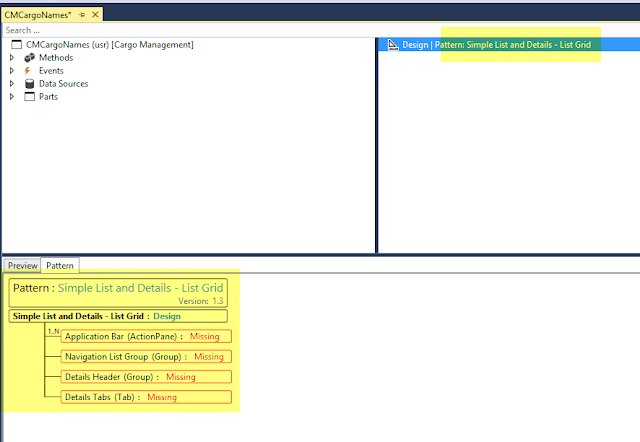
Lets apply Simple list and detals - list grid pattern to our form. Once we apply the pattern, the expected form desing pattern is populated in the pattern tab. It shows which controls are missing, to match it to the pattern

 
As you start adding the controls to your design, the pattern tree keeps updating itself. In the below pic, as I added an Application bar, the control in the tree changes the state.


I added the remaining controls on the design.


We notice that there is a warning symbol next to a few controls. To view what is missing, click on the control under the design node. The particular control structure, as expected from the pattern, will be shown and we can see that we are missing few controls there.

 
Now we can add the missing controls 


Similarly we can do for other nodes in the design.


Another intresting thing which is new in AX7 is that we can apply sub patterns as well. I can apply a pattern to a tab page. To view the available patterns on the tab page, we can right click on the control and select apply pattern and view the available patterns as shown below:


One more intresting thing is that we can generate a form pattern report. To do this, go to Dynamics AX menu --> Addins --> Run form pattern report.

 
This generates a csv file which then can be examined to view which standard forms are using which patterns. It is very useful to build your solution as this can help us decide which pattern should be used for the new form. 
 
 
There are some great articles on Ax wiki related to form patterns:


Saturday, 11 July 2015

AX2012 R3 CU8 : X++ code to get resource requirements for production routes

Hi Friends,
The below X++ code, can be used to get the resource type and the resource ID defined on the production routes for a production order. Thanks to the methods available on ProdRoute table out of the box which makes this easy.

Below is the job simulating the code:


To quickly reuse the code here it is:

static void Job45(Args _args)
{
    ProdRoute                       prodRoute;
    RecId                           recId;
    WrkCtrId                        wrkCtrGrpId;
    ProdId                          prodId = "W000170";
    WrkCtrActivityRequirementType   relationShipType;
    WrkCtrActivityRequirement       wrkCtrActivityRequirement;

    while select prodRoute
        where prodRoute.ProdId == prodId
    {
        recId = prodRoute.activityRequirementSet().RecId;

        select WrkCtrActivityRequirement
            where WrkCtrActivityRequirement.ActivityRequirementSet == recid;
        wrkCtrGrpId =  WrkCtrActivityRequirement.requirementEdit();
        relationShipType = WrkCtrActivityRequirement.RelationshipType;
       
        info(strFmt("%1, %2",relationShipType,wrkCtrGrpId));
    }
}

Have a great day.

Saturday, 25 April 2015

AX2012 R3 : Scheduling dates using X++

Hi Friends,
When required to calculate a future/past dates using X++  based on the working times defined in the working calendar in AX, workcalendarsched class can be used to take off the pain.
The below job shows how we can use the schedDate function and get the result, for simplicity I have passed the calendar name defined in my system as a string:


TransDate       reqDate = systemdateget(), newReqDate;
workCalendarSched   workCalendarSched = new workCalendarSched();
   
newReqDate = workCalendarSched.schedDate(SchedDirection::Forward,reqDate,5,false,'STANDARD');
    info(strfmt("%1",newReqDate));

Another useful method in this class is isdateopen which can be used to check if a particular date is open in the calendar. The good thing about this class is that it uses SysGlobalObjectCache to store and retrieve the values. It improves the performance when running long and complex calculations.

Notice in the below method, if the key exists in cache then the value is returned from there itself else the cache is updated.


The below method of WorkCalendarSched class initialises the variables from global cache.

The global cache scope is stored on the combination of Class + current partition and current company as highlighted below:


This class is also a good example to understand how to use SysGlobalObjectCache.
Thanks for reading the blog. Keep sharing.

Friday, 10 April 2015

Importance of SaveLast() in RunBase Framework

Hi Friends,
RunBase Framework is widely used in AX. In this post, I would like to highlight the importance of SaveLast() function. Understanding of pack/unpack pattern is must to utilize this class in the most effective way.

SaveLast() is used to save the latest state of the class. That means even after the class is unpacked we can still update the packed state of the class.  


One common scenario where it is very useful is when we need to show the values of fields from the caller record on the dialog . In such scenarios this method needs to be called before the prompt() method . This way the packed state is updated with the latest values and in the dialog() method you can access the latest values. 

This can been seen in many standard AX classes which extend RunBase class


So if you are packing some variables, which you are also initialising in the main method and want to show on the dialog, then call saveLast() method before prompt() to get the most recent values.

Thanks for reading the blog. Have a great day.

Saturday, 21 February 2015

Generating QR Codes in AX 2009

Hi Friends,
Recently I worked on a task to generate and show QR code on a report in AX 2009.

In order to do this, I did the below steps:
  • Downloaded file MessagingToolkit.QRCode.dll
  • Copied it in client\bin folder

  • Added this dll file in the system references


  • Create a new display method on the report. The below code can be used to generate QR code.
display container qrcode()
{
    Bindata                 bindata = new Bindata();
    Image                   Imgobj;
    System.Drawing.Image    img;
    System.Drawing.Bitmap   obj;
    Filepath                _path;
    container               con;
    MessagingToolkit.QRCode.Codec.QRCodeEncoder encoder = new MessagingToolkit.QRCode.Codec.QRCodeEncoder();
    ;
    obj = new System.Drawing.Bitmap(encoder.Encode("TESTSTRING"));
    obj.Save(@"C:\temp\newPhoto.bmp",System.Drawing.Imaging.ImageFormat::get_Bmp());
    bindata.loadFile(@"C:\temp\newPhoto.bmp");
    con = bindata.getData();
    return con;
}


  • Add the image control on the report based on the display method. 


QR code can be seen on the report on running it.


There are many other dll files available as open source to generate QR code. Keep sharing.

Reference: I found a link to do the same on AX2012

Wednesday, 14 January 2015

AX2012 R3 : X++ code to start production order

Hi Friends,
The below X++ code can be used to start production orders in AX2012 R3 and R2 versions. I have not tested this in previous versions.


The values which we normally define on start screen can be assigned in the prodParmStartUp table buffer:


In the job I have set the automatic BOM and Route consumption as Never and have also turned off the post picking list and route card journal check boxes.

To use the code quickly here it is, the production order number and quantity are initialized in the _prodId and _qty variables:

static void prodStart(Args _args)
{
    ProdParmStartUp             prodParmStartUp;
    ProdMultiStartUp            prodMultiStartUp;
    ProdId                              _prodId = "W000034";
    Qty                                   _qty = 10000;

    ttsbegin;
    prodMultiStartUp = ProdMultiStartUp::construct(null);
    prodMultiStartUp.parmId(RunBaseMultiParm::getSysParmId());
    prodMultiStartUp.getLast();
    prodMultiStartUp.insert(ProdTable::find(_prodId), prodParmStartUp);
    if (_qty)
    {
        prodParmStartUp.StartUpQty                     = _qty;
        prodParmStartUp.PostNowBOM               = NoYes::No;
        prodParmStartUp.PostNowRoute              = NoYes::No;
        prodParmStartUp.BOMAutoConsump      = BOMAutoConsump::Never;
        prodParmStartUp.RouteAutoConsump      = RouteAutoConsump::Never;
        prodParmStartUp.update();
    }
    prodMultiStartUp.runOnServer();

    info("Done");
    ttsCommit;
}

Thanks for reading the blog. 

Saturday, 8 November 2014

X++ code to change financial dimension when assigning Inventory Site

Hi Friends,
It is good to find the out of the box available API's in Microsoft Dynamics AX, which can take the burden of writing some tricky code off your head. I recently found this API which can be used to link an existing financial dimension with the financial dimension defined on an Inventory site.

This is useful in scenarios where we create journals using X++ code and default/assign the value in inventory site field. This is a static method names changeDimension() available on InventSite table which takes the current financial dimension and the InventSiteID as inputs and returns you the merged Financial dimension. \Data Dictionary\Tables\InventSite\Methods\changeDimension()

A sample X++ code when creating an Inventory journal lines, to use this API would be something like this :
inventJournalTrans.DefaultDimension = InventSite::changeDimension(inventJournalTrans.DefaultDimension,'SITE001');

Inside this method you will find that system uses DimensionDefaultingService class to merge the dimensions.  

You will also notice in the comments that the dimension is merged only when the site link is enabled.
This means that if the financial dimension is linked to Site and the dimension link is locked then any transaction against this site can only be posted if the value of the selected dimension matches the value associated with the Site storage dimension. This setup form can be found at Inventory and Warehouse management -> Setup -> Posting -> Dimension link.
.


So if you are writing X++ code to assign inventory site to any table record which is also storing financial dimension then use the above API . This will make sure that the financial dimension value is merged properly during the creation of the record.

Thanks for reading the blog, Keep sharing.