Saturday, 8 February 2014

AX2012 R2 CU7: X++ code to create and post route card journal for production order

Hi Friends,
The below code can be used to create and post route card journal in AX2012 R2 CU7 for a production order when we know the Production order number and the operation number.
I have assigned the costing resource defined on the route as the work center ID in this case.

static void createRouteCardJournalSample(Args _args)
{
    ProdJournalTable                      prodJournalTable;
    ProdJournalRoute                     prodJournalRoute;
    ProdRoute                               prodRoute;
    ProdId                                     prodId = 'PO000065';
    OprNum                                  oprNum = 10;
    RouteOprId                              routeOprId;
    ProdJournalCheckPostRoute     prodJournalCheckPostRoute;

    select prodRoute where prodRoute.ProdId == prodId
                        && prodRoute.OprNum == oprNum;

    prodJournalTable.clear();
    prodJournalTable.initValue();
    prodJournalTable.JournalType        = prodjournaltype::RouteCard;
    prodJournalTable.ProdId             = prodId;
    prodJournalTable.JournalNameId      = ProdParametersDim::findDefault().RouteJournalNameId;
    prodJournalTable.Description        =                                                  ProdJournalName::find(prodJournalTable.JournalNameId).Description;
    prodJournalTable.VoucherSeqRecId    = ProdJournalName::find(prodJournalTable.JournalNameId).VoucherSeqRecId;
    prodJournalTable.VoucherDraw        = journalVoucherDraw::Post;
    prodJournalTable.NumOfLines         = 1;
    prodJournalTable.insert();

    //Route card entry
    prodJournalRoute.clear();
    prodJournalRoute.JournalId               = prodJournalTable.journalId;
    prodJournalRoute.ProdId                   = prodId;
    prodJournalRoute.initValue();
    prodJournalRoute.OprNum                = oprNum;
    prodJournalRoute.OprId                    = prodRoute.OprId;
    prodJournalRoute.JobType                = RouteJobType::Process;
    prodJournalRoute.CategoryHoursId   = prodRoute.SetUpCategoryId;
    prodJournalRoute.CategoryQtyId      = prodRoute.ProcessCategoryId;
    prodJournalRoute.DefaultDimension  = prodRoute.DefaultDimension;
    prodJournalRoute.WrkCtrId              = prodRoute.WrkCtrIdCost;
    prodJournalRoute.QtyGood              = 2;
    prodJournalRoute.Hours                   = 1;
    prodJournalRoute.insert();
    info(prodJournalTable.JournalId);
   
    ProdJournalCheckPostRoute = ProdJournalCheckPostRoute::newPostJournal(prodJournalRoute.journalId,true);
    ProdJournalCheckPostRoute.run();
}


Thanks

Saturday, 7 December 2013

AX2012 R2 : Understanding purchase requisition [Basics and X++code to create purchase requisitions]

Hi Friends,
In this post I would like to explain about:
  1. What is purchase requisition
  2. Why companies use purchase requisition
  3. Difference between purchase requisition and purchase order
  4. Technical dive in X++ code to create purchase requisition for a project.
What is Purchase Requisition:
  • Be very clear that a purchase requisition is an internal document for a company it is not a contract with the vendor to buy the goods.
  • It is raised by departments to notify the procurement department that they need to purchase some goods to fulfil the requirements.
  • This document has details like which items are required, how much quantity, for what purpose, and till which date the items are required.
  • There can be more details like from which vendor or for which business units that depends on each companies defined templates but the purpose is same.
  • An example is : A production department for a television  manufacturing company can raise a purchase requisition of 1000 panels to fulfil a production demand for the next month.
Why companies use Purchase Requisition:
  • The main goal is to authorize the procurement department to engage a vendor for a purchase commitment.
  • Another advantage is to have a better internal financial control.
  • Normally there are approvers who have the authority to approve the purchase requisition and send the approved requisition to the procurement department. These approvers can be someone from finance departments who work closely with the procurement team. In AX this is handled by workflow very well.
  • The purchase department should not change the details of purchase requisition without getting the approval.
  • Some companies have limits defined for example the procurement department can purchase orders worth maximum $3000 but if the amount is higher then it needs an approved purchase requisition.
Difference between Purchase requisition and Purchase orders:
  • Once a approved purchase requisition is received the procurement department has authority to engage a vendor to fulfil the requirements.
  • This agreement between a vendor and a company is known as Purchase Order.
  • It has details like the vendor name, address, delivery mode, delivery terms, mode of payment, item details, quantity, specification, taxes applicable, delivery dates, delivery schedule.
  • There can be much more complex information embedded in a purchase order like some trade agreement papers, freight provider information etc.
In Microsoft Dynamics AX 2012 R2 we can view Purchase requisition from Procurement and Sourcing --> Common --> Purchase requisition --> All Purchase Requisitions


User can also create new requisitions from this list page. Your user much be attached to a worker in the company otherwise the option to create a new requisition will be disabled.
Also the buying legal entity field will only show the lookup of companies where your user is mapped as a worker.
 

Then user can go ahead and add lines. There is a lot of information we can feed in AX purchase requisitions like buying legal entity, project for which the requisition is required, item, quantity, inventory dimensions, financial dimensions, procurement category, project activity which makes Dynamics AX a great rich application to do such processes :)

My aim here is not to show the complete function steps as there are many good references available
for doing the process, you can refer to the following links :
From here the blog takes a turn towards technical zone:)

I want to share some technical information regarding how we can create purchase requisition from X++ code for a project:
The purchase requisitions are store in  PurchReqTable and the lines are stored in PurchReqLine.
Both the tables are related in PurchReqId which is unique index in PurchReqTable as shown below:


The below job can be used to create a purchase requisition for an item requirement of a project.
We can link a purchase requisition line to a project item requirement.Which means we can define the project activity, procurement category, default vendor for the item, quantity and much more information on the purchase requisition line to have a great visibility of information.

The item requirements for a project are stored as sales lines. In case you do not have any link to project then also you can use the below job to create purchase requisitions by removing the project references from the code:


There are many more fields in PurchReqLine table which can be assigned if you have values to assign to them.

If you want to reuse the code, here it is:
 static void CreatePurchReqJob(Args _args)
{
    PurchReqTable   purchReqTable;
    PurchReqLine    purchReqLine;
    ProjTable       projTable = projTable::find("‪‪‪P000");
    SalesLine       salesLine = SalesLine::findInventTransId("TRANS-00001");
    purchReqTable.clear();
    purchReqTable.initValue();
    purchReqTable.PurchReqId = NumberSeq::newGetNum(PurchReqTable::numRefPurchReqId()).num();
    purchReqTable.PurchReqName = "Testname";
    purchReqTable.ProjId = projTable.ProjId;
    purchReqTable.ProjIdDataArea = projTable.dataAreaId;
    purchReqTable.insert();
    purchReqLine.clear();
    purchReqLine.initValue();
    purchReqLine.InventDimId = salesLine.InventDimId;
    purchReqLine.initFromPurchReqTable(purchReqTable);
    purchReqLine.ItemId = salesLine.ItemId;
    purchReqLine.ActivityNumber = salesLine.ActivityNumber;
    purchReqLine.BuyingLegalEntity = CompanyInfo::find().RecId;
    purchReqLine.InventDimIdDataArea = salesLine.dataAreaId;
    purchReqLine.initFromProjTable(projTable);
    purchReqLine.insert();
    info(purchReqTable.PurchReqId);

}

If you might have read closely then you must have noticed that numRefPurchReqId() method is available on PurchReqTable itself :)


The init methods on the table are quite helpful as they initialize number of fields for us so we do not need to worry unless we have some custom logic to initialize them.
So now that we have a basic understanding of purchase requisitions and how they are different from purchase orders with some pinch of technical flavour I hope this information will be helpful.

Thanks for reading the blog.


Thursday, 28 November 2013

AX2012 R2 : Adding new fields on list page grid using new data source

Hi Friends,
Recently I was adding new fields on a positions list page grid in payroll module and these fields were coming from a new custom table. The steps are simple with one tricky part:

1. Create new table, define proper relations with other tables.


2. Add the table in the query used on the list page.


3. This is a tricky part: When you come back to list page and try to restore the form you will not be able to see the new data source. To do this right click on the data source node and again define the name of the query. This will reload the new structure from the query.


4. Then you can view the data source which you added in the query and then can drag the fields in the grid.


Thanks for reading the blog.


Wednesday, 27 November 2013

AX2012 R2: Adding generic custom validations when posting sales orders

Hi Friends,
It is good to keep this information handy so I posted on the blog.
If we need to add our own custom validation for salesTable/Customer record when performing posting on sales orders, then the best place to write the logic is \Classes\SalesFormletterProvider\checkHeading().
This function is called to check some generic rules  for salesTable or Customer during any type of posting (Confirmation/Picking/Packing/Invoicing) process of sales order.

See below the way  standard AX does it.


You can create a method on salesTable which returns a boolean value and call it along with other standard AX validations.
You can check the posting type by using the function this.parmDocumentStatus() so that if you want to run  validation only for specific posting type you can run it.
Note this approach should only be taken when you have to add some generic validations applicable on all types of posting.

Thanks for reading the blog.


Friday, 22 November 2013

AX2012 R2 : X++ Code to create picking list journal for a production order

Hi Friends,
Below is the sample of X++ code which can be used to create a picking list journal for a production order.
The journal header table is ProdJournalTable and the lines are stored in ProdJournalBOM table.
The table are related on the basis of Journal Type and Journal ID. The relation is defined on ProdJournalBOM table as shown below:


If you take a closer look, the 0 element in Base Enum of journal type field is "Picking list"


So the header table for all the journal types of production orders is ProdJournalTable. The lines table differ and can be easily traced from the forms and relations.

For illustration purpose I have hard coded some values but in real time u can get these form your functions/parameters/maps/list etc. Also I have created only one line, in real time scenarios you can have a list/function/while loop to create the lines for multiple items.


The difference see from AX2009 is the way we initialize voucherSeqRecId field of the journal header as it now stores the RecId of the voucher number sequenceID.

There are more fields in the prodJournalBOM table but with the minimum fields I included in the job, journal can be created and posted. In case you have record of ProdBOM table available for which you want to create the journal line then the task becomes more easy as you can call initFromProdBOM() function of the prodJournalBOM table as it can initialize the following fields and we can eliminate these lines from our job:


If you want to quickly reuse the code, here it is:

static void samplePickingListJournal(Args _args)
{
    ProdJournalTable    prodJournalTable;
    ProdJournalBOM      prodJournalBOM;
    ProdTable           prodTable = prodTable::find("PO-001159");

    prodJournalTable.clear();
    prodJournalTable.initValue();
    prodJournalTable.JournalType    = ProdJournalType::Picklist;
    prodJournalTable.JournalNameId  = 'pickJrnl';
    prodJournalTable.Description    = " Prod pick list journal";
    prodJournalTable.ProdId         = prodTable.ProdId;
    prodJournalTable.VoucherDraw    = JournalVoucherDraw::Post;
    prodJournalTable.VoucherSeqRecId = NumberSequenceTable::find(ProdParameters::numRefProdJournalVoucherId().NumberSequenceId).RecId;
    prodJournalTable.insert();

    prodJournalBOM.clear();
    prodJournalBOM.initValue();
    prodJournalBOM.JournalId        = prodJournalTable.JournalId;
    prodJournalBOM.initFromInventTable(InventTable::find("MAT001"));
    prodJournalBom.ProdId           = prodTable.ProdId;
    prodJournalBom.LineNum          = 1;
    prodJournalBom.InventDimId      = "DIMID-99876";
    prodJournalBom.TransDate        = systemDateGet();
    prodJournalBom.BOMUnitId        = "Pcs";
    prodJournalBom.BOMConsump       = 10;
    prodJournalBom.InventConsump    = 10;
    prodJournalBom.insert();
    ttsBegin;
    prodJournalTable.selectForUpdate(true);
    prodJournalTable.NumOfLines = 1;
    prodJournalTable.update();
    ttsCommit;
    info(strFmt("Journal %1 created",prodJournalTable.JournalId));
}

Thanks for reading the blog.

Saturday, 15 June 2013

AX2012 R2 : Creating product variants based on generic product model using X++

Hi Friends,
In one of my recent tasks, I was required to automatically create the product variants for a product master as per all the suggested product variants by the system based on generic product model. So I need to automate the below shown process which if done manually for all items will consume lot of time:


These variant suggestions are based on the defined product variants ( refer to my previous post to get technical understanding of tables storing this information here).

So I did some technical analysis and found the following:
  • The class used by standard AX to create variant suggestion is EcoResProductVariantCreationMgr.
  • It populates a temperory table to store all the variant suggestions, but by default is keeps the selected field as false.
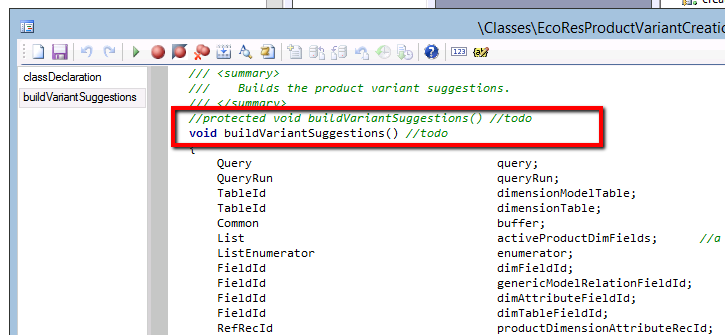
  • The function filling this temperoary table is a buildVariantSuggestion() is a protected function, so I cannot call it directly from my code.
So there were few challenges in directly using this class from my job but with few simple customizations in this class, I was able to utilize this class for creating the product variants in a much simple way rather then re writing all the logic inside the class in my job. So I did the following changes:
1. Added a new boolean variable in class declartion and created a parm method for it. This is to initialize this variable when it is called from my custom code and tweak the way temperory table is created:
2. Changed to access modifier of the buildVariantSuggestion() 

3. In case the class is called from custom code then we need to mark the records as selected:


So with the above three modifications in standard AX class, I was ready to use this class in my job and I created the below sampe piece of job:

We assigned the EcoResProductMaster record in the args and used that to initialize the class, used the RecId of the productMaster to find the record.
Then we called the parmCalledFromJob method and set it as true to tell system that this class is trigerred from my custom code.
We called the buildVariantSuggestions() , as this is no longer protected I can directly call from my job [This design can be improved by creating a child class instead of changing the access modifier].

So now I ran the job  for the same product which I have shown in the first screenshot:


and then when we look at product variants, we see that system has created the product variants :)


P.S --> Before modifying EcoResProductVariantCreationMgr class, please check if this is not conflicting with any other modifications in your system. Especially modifiyng the access modifier is not a recommened thing to do always, however I did this as it was a one time job which we need to run and then reverted back the changes.

Sometimes it is much easy to tweak the standard AX objects and leverage the existing code instead of rewriting the whole logic.

Till my next post.....take care friends and keep sharing.


Friday, 7 June 2013

AX2012 R2 : Understanding technical design of product dimensions data

Hi,

In this blog we will take a dive into tables storing product dimension data for product master and also look at the code which we can use to generate this data automatically.
Standard Microsoft Dynamics AX 2012 R2 provide the following product dimensions: Configuration, Size, Color, Style. For each dimension there is a master table as shown below:


Notice that each master table has only one field called "Name" and each master table has unique index defined on this field.


So the above table hold the master data for the product dimensions in the system.

Now there are another set of 4 table which store the product dimension data for a product master. Shown below:

The above 8 tables can be seen as datasources on EcoResProductMasterDimension form where we define the product dimension data for product master.


For understanding purposes let us focus on configuration dimension and try to explore EcoResProductMasterConfiguration table.

If we notice the fields and relations on this table, we see it is storing the following references in each record:


  • ConfigProductMaster --> Stores RecId of product master
  • Configuration --> Stores the RecId of EcoResConfiguration ( This is the master table configurations)
  • ConfigProductDimensionAttribute --> Stores RecId of dimension attribute [Let's park this field for now , we'll come to it later]
So now once we have understood how the tables are related, let's see the X++ code which we can create product dimensions for a product master by pulling data from the master tables.
[P.S --> Currently we are focussing only on product dimension configuration]
 
So now let's understand the above code: The logic is pretty simple, we just need to know the recId of product master and the dimension for which we are going to create the product dimensions [In this case Configuration]. Loop through the ecoResConfiguration table and insert record for Product master.
But the interesting thing to notice is, the way we have initialized ConfigProductDimensionAttribute. This field stores refRecId.  The same code can be found on the standard AX form where we create product dimensions for product master, shown below:
 
 
So to understand this field ( which we parked earlier), let's take a closer look at the table EcoResProductDimensionAttribute
 
 
We will see this table only holds a single field DimensionTableId which is actually a RefTableId.
 
On closer look if we look in the table browser, the records in this table store the tableId of the dimension master tables [EcoResSize, EcoResConfiguration, EcoResColor, EcoResStyle] , see below the example for EcoResConfiguration:


Well doesn't it looks odd to have table Id stored in a table, and in order to get the recId of that record we are using a static function
EcoResProductDimensionAttribute::inventDimFieldId2DimensionAttributeRecId(fieldNum(InventDim, ConfigId));
in which we pass the fieldNum of ConfigId field of InventDim Table !!!!!!! 
 
The answer lies in the static function itself, see below the function:
 
 
The tableId is being determined by the configId fieldNum of InventDim table. What I think is that Microsoft wants to make sure that we do not use these tables for storing incorrect data and we can refer to them from dimension fieldID's itself. I see this might provide a tight binding of data model from code for storing dimensions. No one really wants to mess them ;)
 
So now show time, let's create a product master with attach a product dimension with only color enabled in it.

 
So now once the product master is created, let's see what are the colors stored in EcoResColor table:
To do this we can view details of colors available from the form where we define color dimensions for product master


So now we need a programme define all these colors for this product master, let's use the code I mentioned above but with the tables of color dimensions this time: so let's execute the code: [ notice this time we have used tables storing colorId]
 
Once the code is executed and now let go to product dimension form for the product master and see the color are defined for the product master:
 
 
So the above code can be useful in implementing product master for companies which have a common dimension master data which they want to assign to all products.
In my next blog I'll continue to explain on how we can create released product variants from the product dimension data defined for product master.
 
Till then take care friends and keep sharing!!!!