Saturday, 15 June 2013

AX2012 R2 : Creating product variants based on generic product model using X++

Hi Friends,
In one of my recent tasks, I was required to automatically create the product variants for a product master as per all the suggested product variants by the system based on generic product model. So I need to automate the below shown process which if done manually for all items will consume lot of time:


These variant suggestions are based on the defined product variants ( refer to my previous post to get technical understanding of tables storing this information here).

So I did some technical analysis and found the following:
  • The class used by standard AX to create variant suggestion is EcoResProductVariantCreationMgr.
  • It populates a temperory table to store all the variant suggestions, but by default is keeps the selected field as false.
  • The function filling this temperoary table is a buildVariantSuggestion() is a protected function, so I cannot call it directly from my code.
So there were few challenges in directly using this class from my job but with few simple customizations in this class, I was able to utilize this class for creating the product variants in a much simple way rather then re writing all the logic inside the class in my job. So I did the following changes:
1. Added a new boolean variable in class declartion and created a parm method for it. This is to initialize this variable when it is called from my custom code and tweak the way temperory table is created:
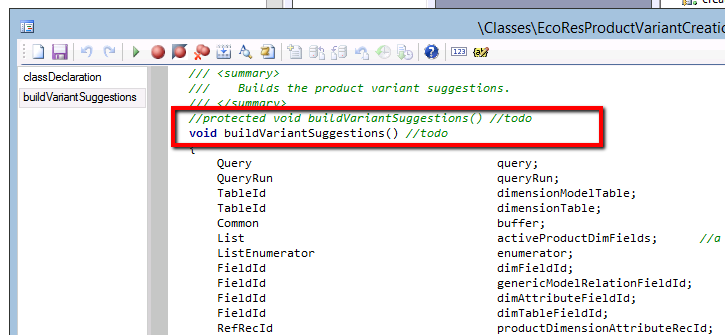
2. Changed to access modifier of the buildVariantSuggestion() 
3. In case the class is called from custom code then we need to mark the records as selected:


So with the above three modifications in standard AX class, I was ready to use this class in my job and I created the below sampe piece of job:

We assigned the EcoResProductMaster record in the args and used that to initialize the class, used the RecId of the productMaster to find the record.
Then we called the parmCalledFromJob method and set it as true to tell system that this class is trigerred from my custom code.
We called the buildVariantSuggestions() , as this is no longer protected I can directly call from my job [This design can be improved by creating a child class instead of changing the access modifier].

So now I ran the job  for the same product which I have shown in the first screenshot:


and then when we look at product variants, we see that system has created the product variants :)


P.S --> Before modifying EcoResProductVariantCreationMgr class, please check if this is not conflicting with any other modifications in your system. Especially modifiyng the access modifier is not a recommened thing to do always, however I did this as it was a one time job which we need to run and then reverted back the changes.

Sometimes it is much easy to tweak the standard AX objects and leverage the existing code instead of rewriting the whole logic.

Till my next post.....take care friends and keep sharing.


Friday, 7 June 2013

AX2012 R2 : Understanding technical design of product dimensions data

Hi,

In this blog we will take a dive into tables storing product dimension data for product master and also look at the code which we can use to generate this data automatically.
Standard Microsoft Dynamics AX 2012 R2 provide the following product dimensions: Configuration, Size, Color, Style. For each dimension there is a master table as shown below:


Notice that each master table has only one field called "Name" and each master table has unique index defined on this field.


So the above table hold the master data for the product dimensions in the system.

Now there are another set of 4 table which store the product dimension data for a product master. Shown below:

The above 8 tables can be seen as datasources on EcoResProductMasterDimension form where we define the product dimension data for product master.


For understanding purposes let us focus on configuration dimension and try to explore EcoResProductMasterConfiguration table.

If we notice the fields and relations on this table, we see it is storing the following references in each record:


  • ConfigProductMaster --> Stores RecId of product master
  • Configuration --> Stores the RecId of EcoResConfiguration ( This is the master table configurations)
  • ConfigProductDimensionAttribute --> Stores RecId of dimension attribute [Let's park this field for now , we'll come to it later]
So now once we have understood how the tables are related, let's see the X++ code which we can create product dimensions for a product master by pulling data from the master tables.
[P.S --> Currently we are focussing only on product dimension configuration]
 
So now let's understand the above code: The logic is pretty simple, we just need to know the recId of product master and the dimension for which we are going to create the product dimensions [In this case Configuration]. Loop through the ecoResConfiguration table and insert record for Product master.
But the interesting thing to notice is, the way we have initialized ConfigProductDimensionAttribute. This field stores refRecId.  The same code can be found on the standard AX form where we create product dimensions for product master, shown below:
 
 
So to understand this field ( which we parked earlier), let's take a closer look at the table EcoResProductDimensionAttribute
 
 
We will see this table only holds a single field DimensionTableId which is actually a RefTableId.
 
On closer look if we look in the table browser, the records in this table store the tableId of the dimension master tables [EcoResSize, EcoResConfiguration, EcoResColor, EcoResStyle] , see below the example for EcoResConfiguration:


Well doesn't it looks odd to have table Id stored in a table, and in order to get the recId of that record we are using a static function
EcoResProductDimensionAttribute::inventDimFieldId2DimensionAttributeRecId(fieldNum(InventDim, ConfigId));
in which we pass the fieldNum of ConfigId field of InventDim Table !!!!!!! 
 
The answer lies in the static function itself, see below the function:
 
 
The tableId is being determined by the configId fieldNum of InventDim table. What I think is that Microsoft wants to make sure that we do not use these tables for storing incorrect data and we can refer to them from dimension fieldID's itself. I see this might provide a tight binding of data model from code for storing dimensions. No one really wants to mess them ;)
 
So now show time, let's create a product master with attach a product dimension with only color enabled in it.

 
So now once the product master is created, let's see what are the colors stored in EcoResColor table:
To do this we can view details of colors available from the form where we define color dimensions for product master


So now we need a programme define all these colors for this product master, let's use the code I mentioned above but with the tables of color dimensions this time: so let's execute the code: [ notice this time we have used tables storing colorId]
 
Once the code is executed and now let go to product dimension form for the product master and see the color are defined for the product master:
 
 
So the above code can be useful in implementing product master for companies which have a common dimension master data which they want to assign to all products.
In my next blog I'll continue to explain on how we can create released product variants from the product dimension data defined for product master.
 
Till then take care friends and keep sharing!!!!


Tuesday, 21 May 2013

AX2012 R2 : X++ code to create and post Inventory Movement Journal

Below is X++ code which is good to keep handy. It can be used to create and post inventory movement journals in AX 2012 R2. I have use hard coded values for illustration purpose:


        InventJournalTable              inventJournalTable;
        InventJournalTrans              inventJournalTrans;
        InventJournalNameId             inventJournalName;
        InventDim                            inventDim;
        JournalCheckPost               journalCheckPost;

        //Below code creates journal header        
        inventJournalTable.clear();
        inventJournalName =  InventJournalName::standardJournalName(InventJournalType::Movement);
        inventJournalTable.initFromInventJournalName(InventJournalName::find(inventJournalName ));
        inventJournalTable.insert();

        //Below code creates journal lines
        inventJournalTrans.clear();
        inventJournalTrans.initFromInventJournalTable(inventJournalTable);
        inventJournalTrans.TransDate = systemDateGet();
        inventJournalTrans.ItemId = "MDJ0001";
        inventJournalTrans.initFromInventTable(InventTable::find("MDJ0001"));
        inventJournalTrans.Qty = 2500;
        inventDim.InventSiteId  = '12';
        inventDim.InventLocationId = '1201';
        inventDim.wMSLocationId = 'BULK-001';
        inventJournalTrans.InventDimId = inventDim::findOrCreate(inventDim).inventDimId;
        inventJournalTrans.insert();


        //The below code posts the journal
        journalCheckPost = InventJournalCheckPost::newPostJournal(inventJournalTable);
        journalCheckPost.run();


Friday, 22 March 2013

AX2012: X++ code to get on hand on an item

Hi Friends,
In this post I would like to share a small piece of code using which we can get oh hand values for an item. Before jumping to it I would first like to share some basic information related to on hand information.
What do we need to know when we have to calculate on hand of an item?
Let us take the below example:
A company has one site , two warehouses , each warehouse has four locations and each location has two pallets. Each pallet is having 10 Pcs of an Item "CAB001" . I have illustrated the view in the below diagram:


Now if someone ask you what is the on hand of item "CAB001" you might respond back with a question : Where, in warehouse WH001 or in WH001 - Loc001 or in WH002-Loc003-P5 ??
The person will elaborate the question again: What is on hand of item "CAB001" in Warehouse WH001-Loc 003? And then you can easily say that the on hand is 20 Pcs. So let's try to see on hand values of our sample item in some different cases:
Site S001 --> 160 Pcs
Site S001, Warehouse WH001 --> 80 Pcs
Site S001, Warehouse WH002 - Loc002 --> 20 Pcs
Site S001, Warehosue WH002 - Loc004 - P7 --> 10 Pcs

So you will notice that on hand value changes with reference to the combination of inventory dimensions i.e. InventDimID against which we need to calculate the on hand of an Item. In my previous post (understanding-inventdimid ) I have explained how an InventDimID refers to a combination of Inventory Dimensions.

So now we know that in order to calculate on hand of an item we also need to know the inventory Dimensions against which we need to calculate it.
Another thing which we need to know is what on hand value we want to calculate. If you look at on hand screen you can see that on hands are calculated with respect to various business meanings:


AX out of the box provides us with classes to calculate on hand values . We can use InventOnHand class to calculate the required on hand values, below is a sample job to calculate available physical qty of the item D0001 (as shown in above image) in site 1, WH 13:


Result and mapping shown below:


InventOnHand class has other functions as well to return different qty , sample shown below:
We can also point to inventSum table object from invnetOnHand Class as get access to other on hand
values as shown below:

 Use InventOnHand class and simplify your on hand calculations.
Thanks!!!


AX2012 : Understanding InventDimID

Hi Friends,
In this post I will describe my view of what is InventDimID and how we can use it in our solutions.

We know there are different inventory dimensions available in Microsoft Dynamics AX like Site, Warehouse, Location, Pallet, Batch number, Serial number etc. These can be active for an item based on the storage dimensions assigned on it.


Let us take an example, we have an Item "BRK6348" on which Site, Warehouse, Location, Pallet ID are active and we did an inventory transaction on this item say on Site '01', Warehouse 'Main', Location 'LOC001' and Pallet Id 'PLT001' and we want to design a table to store all these values on our custom transaction table.

A simple approach is to add fields for all the inventory dimensions in your table. Imagine if there are 10 inventory dimensions in system then we need to add 10 fields in our table and if we have 100 inventory transactions for this item on the set of these inventory dimension combination then we will storing same data in 100 records in all 10 fields. This will bloat the database size and also impact the performance of queries on this table.  A sample of such table would look like below:


Now to simplify this we create a new ID field which refers to a set of combination of these values. For example ID "10001" refers to  Site '01', Warehouse 'Main', Location 'LOC001' and Pallet Id 'PLT001'. We also create a separate table to store values of these 10 fields along with this ID field and add ID field in our transaction table. So in all 100 records we can store data in only one ID field.
We are not required to store data of 10 inventory dimensions fields 100 times, instead we just need to store value of 1 field in 100 records pointing to same combination of these inventory dimensions.  A sample of such tables with some records will look as below:


This ID in Dynamics AX is known as InventDimID and the table which stores all the combinations of inventory dimensions and there ID is InventDim:


This table plays very important role in AX. Any table which stores inventory dimensions in AX like salesLine, purchLine,inventTrans all have relation to inventDim table.


There are already functions to create and find inventDimID for a combination if inventory dimensions . Most commonly used is findOrCreate just initialize a blank instance of inventDim table object, assign all your inventory dimensions and then call this function to assign the inventDimID to your record. If a invnetDimID for the combination exists then system will return it else it'll create a new and return the inventDimId.


So if you are designing new tables in system to store inventory dimensions, then leverage this smart database architecture of AX and give your solution a smart design.


Friday, 21 December 2012

X++ code to define OR conditions in QueryBuildRange for a same field in a simple way

This blog post is show how to apply OR conditions in query ranges in a simple way on a same field in a table.

For example let's take a very simple select statement:
select * from CustGroup where custGroup.CustGroup == '10' || custGroup.Group =='20';

We can of course achieve the above by using expression in query ranges (MSDN) but as it has lot of specifications which needs to be followed (Axaptapedia)  and also in situations when we do not know how many values we want to pass in the range, the above approach can be a nightmare.

However there is a simple way also: Just add range and assign value on the same field multiple times as shown below:


Query   q;
QueryBuildDataSource    qbds;
QueryRun  qr;
QueryBuildRange qbr;
;
q = new Query();
qbds = q.addDataSource(tableNum(CustGroup));
qbr = qbds.addRange(fieldNum(CustGroup,CustGroup));
qbr.value(queryValue('10'));
 
qbr = qbds.addRange(fieldNum(CustGroup,CustGroup));
qbr.value(queryValue('20'));
 
info(qbds.toString());

 The resultant select statement can be seen in below image.


Well, there are some points to remember when taking the above approach:

1. Add range on the field every time you want to have a new value in OR condition. If you apply the range only once and assign the value multiple times then system will pick the value which is assigned in the last statement something like the below image:


2. You can use the same queryBuildRange variable to assign the range multiple times. Even if you use different queryBuildRange variables system will apply it correctly. It also works without a queryBuildRange variable, you can directly apply range on QueryBuildDataSource object (this is shown in the last image).


The above code is useful in situations which I talked earlier, when you are getting the range values at run time from some list,map or may be another query. We can add ranges on the same field inside a while loop which creates the corresponding OR conditions in the resulting select statement, a sample of such code is shown below where I created a list having the customer group values on which I want to assign in the OR condition.


Thanks!!!


Wednesday, 1 August 2012

AX2012: X++ Code to verify active inventory dimensions on an item


Recently I came across a situation where I needed to validate if the inventory dimension "PalletId" is active on an item or not. After a little digging here and there, came across this piece of standard AX code to identify if an inventory dimension is active or not. It is always good to re-use standard AX code instead of writing our own logic. This helps in maintaining the quality of the code.


   InventTable     inventTable;
   InventDimParm   inventDimParm;
   ;
   inventTable   = InventTable::find('1000');
   inventDimParm =  InventDimParm::activeDimFlag(InventDimGroupSetup::newInventTable(inventTable));
   if(inventDimParm.WMSPalletIdFlag)
   {
       info("Pallet Enabled");
   }

Similarly we can validate other inventory dimensions as well.